The route model
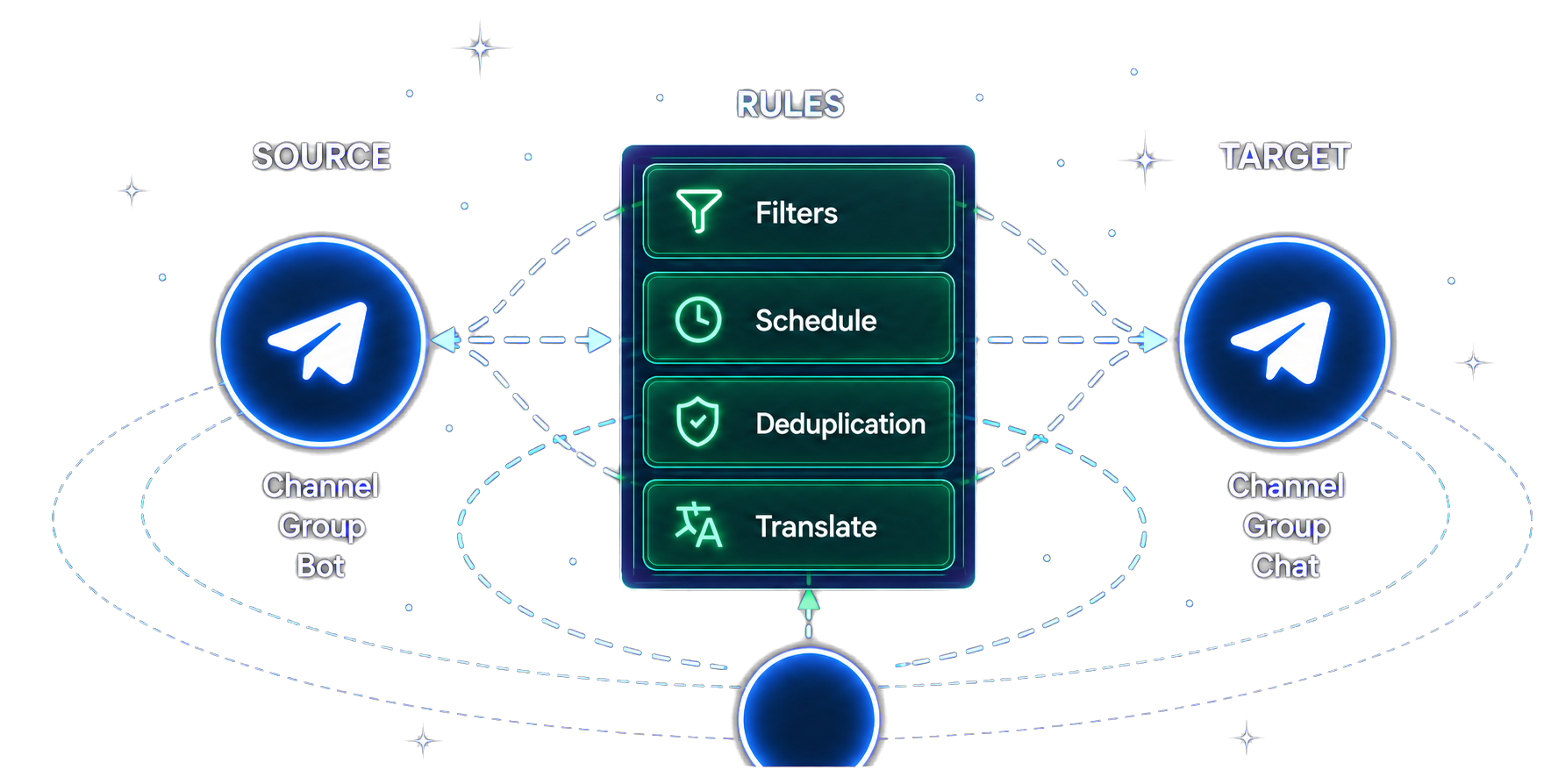
A reliable setup is a closed loop: the connected account reads an authorized source, route rules decide what is processed, the target receives the result, and a controlled verification catches mistakes before the route becomes operational.
The current task-creation documentation lists channel, group, user, and bot selectors for both source and target. Review task creation
Before you start
Confirm the access, rights, and output expectations before adding automation.
- Source accessThe connected account can already read the source.
- Target accessThe connected account can deliver to the target.
- Content rightsYou are authorized to copy, transform, and redistribute the content.
- Expected outputYou know whether attribution and transformations should appear.
Private and paid/VIP sources are supported when the connected Telegram account is authorized to access them. Protected content can require a download-and-re-upload path and may still fail when Telegram does not make the media available. Review private-source guidance
Choose Telegram Bot or Web/App setup
The two documented entry flows connect the same kind of Telegram account, but they use different interfaces. The product documentation does not publish a complete feature-parity matrix, so choose by setup surface rather than assuming one exposes every feature.
| Step | Telegram Bot | Web, Android, or iOS |
|---|---|---|
| Start | Open the Bot and run /connect Phone_Number. | Open the Web or mobile app and enter the phone number registered with Telegram. |
| Verify | Follow the Bot prompts for the Telegram code and two-factor password format. | Enter the code delivered inside Telegram, then the two-step-verification password if prompted. |
| Create a route | Continue with the connected account’s task-command workflow. | Open Forwarding List, select Create Task +, then choose the source and target. |
Bot connection instructions · Web/mobile connection instructions · Visual task-creation instructions
Follow these six steps
Build the smallest useful route first. Verify that route before adding filters or transformations.
- 1
Connect your Telegram account
Use /connect with the Telegram Bot, or enter your Telegram phone number in the Web or mobile app. Complete the Telegram-delivered code and two-step-verification password when required.
- 2
Create a forwarding task
In Web or mobile, open Forwarding List and select Create Task +. In the Bot, follow the connected account’s task-command workflow.
- 3
Choose a source
Select a channel, group, user, or bot that the connected account can read. If a recently joined chat is missing, use Reload only when necessary.
- 4
Choose a target
Select the destination channel, group, user, or bot and confirm the connected account can deliver there.
- 5
Add only verified rules
Filters skip whole matching messages; Cleaner removes selected content. Duplicate Filters, translation, and other transformations should be enabled one at a time and tested.
- 6
Verify before relying on the route
Send content you are authorized to use, confirm the exact destination result, then review early delivery for permission, rule, attribution, or delay problems.
Rules and transformations that change the result
These controls have different effects. Treat each one as a separate decision and re-test after enabling it.
Filters
Skip an entire message when its type or condition matches. Filter documentation
Cleaner
Remove selected elements such as links, previews, hashtags, or other content from a message that is still forwarded. Cleaner documentation
Duplicate Filters
The current product preset retains up to 50 matching items for 7 days. Matching reduces lowercased exact-content repeats; concurrent sends, restarts, eviction, and configuration changes mean it is not a zero-duplicate guarantee. Duplicate Filters documentation
Translation and Replace
Transform output content. The documentation warns of incompatibilities with Show Forward Header, so decide attribution behavior first. Translation · Replace
Forward header
Retains source information when enabled and offers documented display modes. Verify the resulting attribution in the target. Forward Header documentation
Supported capabilities — with the conditions that matter
These capabilities are supported by the current product surfaces or implementation. The qualifications are part of the capability, not fine print.
Private and paid/VIP sources
Private and paid/VIP sources are supported when the connected Telegram account is authorized to access them. Telegram permissions, protected-media availability, content rights, and source restrictions still apply.
No source-side bot join
Account-connected forwarding can read a source without adding a bot there. The configured sender still needs permission to post to every target; a channel may require posting or admin rights. Why account access is used
Scheduling and timezone
Timezone-aware scheduling and forwarding windows are supported. This is not a separately proven do-not-disturb or universal quiet-hours guarantee. Scheduler documentation
Duplicate-control window
Duplicate control has a standard 7-day, 50-item preset and configurable plan-dependent controls. It reduces repeats but is not a zero-duplicate guarantee.
Clone, backup, and real-time routes
Configuration backup, historical message cloning, and real-time forwarding are separate flows. Automatic configuration snapshots can be eligibility-gated and rate-limited; no atomic clone-to-live cutover is promised. Clone documentation
Hosted operation and pricing
Configured routes can run on the hosted service while the runtime and Telegram session remain healthy, so the device can be offline. This is not an uptime SLA. Free, Trial Platinum, Gold, Diamond, and Platinum entitlements are enforced by the active account. Paid prices shown here follow the Telegram Bot pricing table; trial eligibility, active limits, and final checkout totals must be confirmed in the product. Offline-device guidance
Troubleshooting paths
Start with the earliest boundary that can explain the symptom, then add complexity back one rule at a time.
Source is missing
- Confirm the account is joined
- Select All to check the source type
- Use Reload only when a recent chat has not synchronized
Messages do not arrive
- Confirm source and target IDs
- Confirm read/post access
- Temporarily remove active filters and transformations
Expected content is missing
- Separate Filters from Cleaner behavior
- Review whitelist and blacklist rules
- Test one representative message
Duplicates appear
- Confirm only one intended route reaches the target
- Verify the 7-day/50-item preset or your advanced settings
- Account for concurrent sends, restarts, and cache eviction
Delivery is delayed
- Reduce unnecessary simultaneous tasks
- Review Replace, Blacklist, and Whitelist load
- Reduce unnecessary high-volume chat involvement
Final verification checklist
- Connected account can read the selected source
- Connected account can deliver to the selected target
- A plain route works before extra rules are enabled
- Filters and Cleaner produce the intended difference
- Attribution/header behavior is visible and acceptable
- Duplicate Filters are tested with the selected retention and memory limits
- Representative text, media, links, and formatting are checked
- Only authorized content is used
- Early delivery and delays are monitored
FAQ
Answers are bounded to current product evidence, public documentation, and account state.
Can I forward messages from private channels or groups?
Private and paid/VIP sources are supported when the connected Telegram account is authorized to access them. Telegram permissions, protected-media availability, content rights, and source restrictions still apply.
Will forwarded messages show the original sender?
The result depends on the forwarding mode and any configured message transformations. Verify the destination output with content you are allowed to use before activating an important route.
Can I translate messages before forwarding?
Translation can be configured as a route rule when the active product surface and plan expose it. Test language direction, formatting, links, and entities with representative content before relying on it.
Is there a limit to how many routes I can create?
Route capacity and feature access depend on the current plan and account state. Check the live product pricing surface or your account instead of relying on a static number in this guide.
What happens if Telegram changes something?
Permissions, rate limits, and platform behavior can affect routes. Monitor important flows and re-check current product and Telegram documentation when delivery behavior changes.
Sources and methodology
Reviewed on July 23, 2026 against current product implementation, active Bot surfaces, and public product documentation. Public docs explain user-facing setup; implementation evidence verifies capability boundaries but does not prove live uptime or a checkout price. Recommendations about testing, rights, and monitoring are labeled operating guidance.
July 23, 2026
Product + docs evidence
Editorial roadmap
These topics are planned, not published articles. They become links only after their own evidence and review gates pass.
 Planned
Configure Duplicate Filters for Repeated Messages
Understand the documented Duplicate Filters control and verify repeated-message behavior without assuming a zero-duplicate guarantee.
 Planned
Telegram Scheduling: Intervals, Fixed Times and Repeats
Configure the scheduler modes documented by the product and verify what each mode sends.
 Planned
Configure Source-to-Target Translation
Choose a documented translation direction and test formatting and Forward Header compatibility.
 Planned
Advanced Filters: Keywords, Sources and Content Types
Capture exactly what you need with precise filtering conditions.